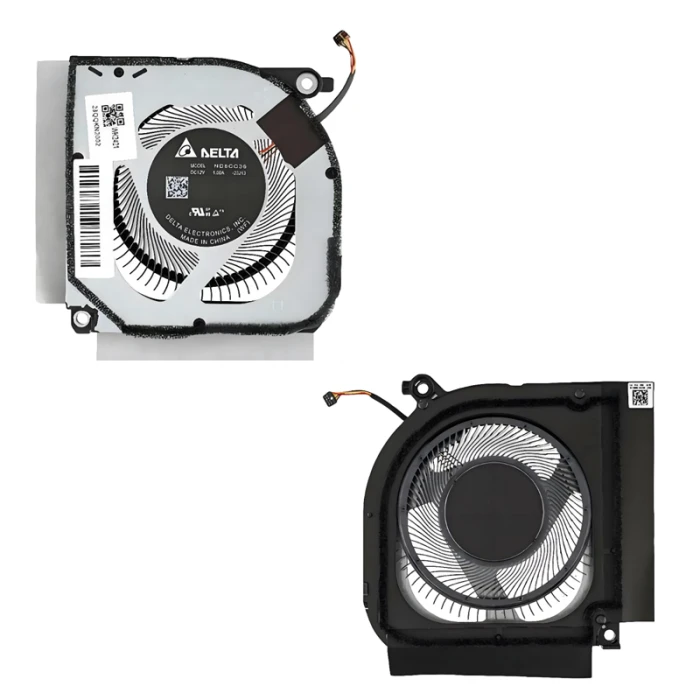
Acer Nitro 14 AN14-41 GPU Fan original plastic
hot sales| Model | ND8CC36-23J13 |
| Power: | DC 12V 1.0A |
| Connector: | 4 wires 4 pins |
| Condition: | NEW |
| Compatible |
ND8CC36-23J13 23.QQKN2.002 ,Nitro 14 An14-41-r039 Nitro 14 An14-41-r0cd Nitro 14 An14-41-r0kz Nitro 14 An14-41-r0my Nitro 14 An14-41-r0ty Nitro 14 An14-41-r1n7 Nitro 14 An14-41-r1sd Nitro 14 An14-41-r245 Nitro 14 An14-41-r28g Nitro 14 An14-41-r29t Nitro 14 An14-41-r2yp Nitro 14 An14-41-r3dl |
Product Description
Acer Nitro 14 AN14-41 GPU Fan original plastic is a high-quality replacement cooling fan designed for your laptop. This model (ND8CC36-23J13) is manufactured to meet or exceed original specifications, ensuring reliable performance and long service life.
Key Specifications:
- Model: ND8CC36-23J13
- SKU: LT-10029722
- Power: DC 12V 1.0A
- Connector: 4 wires 4 pins
- Condition: Brand New
- Warranty: 90‑day replacement guarantee
Compatible Part Numbers:
ND8CC36-23J13
23.QQKN2.002
,Nitro 14 An14-41-r039
Nitro 14 An14-41-r0cd
Nitro 14 An14-41-r0kz
Nitro 14 An14-41-r0my
Nitro 14 An14-41-r0ty
Nitro 14 An14-41-r1n7
Nitro 14 An14-41-r1sd
Nitro 14 An14-41-r245
Nitro 14 An14-41-r28g
Nitro 14 An14-41-r29t
Nitro 14 An14-41-r2yp
Nitro 14 An14-41-r3dl
Important Notes:
- Always compare our product photos with your original fan – check the connector type, screw hole positions, and overall dimensions. Even if the model matches, physical appearance can vary.
- The screw hole positions of fans from different manufacturers are different – ensure they match your heat sink.
- Sticker may vary – the label on the fan may differ, but functionality and compatibility are guaranteed.
- Original vs OEM – we offer both options. Original parts are higher quality, while OEM parts are more affordable and may be the only option for older laptops.
Genuine Acer Nitro 14 AN14‑41 GPU Cooling Fan – ND8CC36‑23J13
Keep your Acer Nitro 14 gaming laptop running at peak performance with this authentic original GPU cooling fan. Designed specifically for the AN14‑41 model, this fan ensures efficient heat dissipation from the graphics processing unit, preventing thermal throttling and maintaining stable frame rates during intensive gaming or creative workloads.
Product Overview
Compatible Model: Acer Nitro 14 AN14‑41
Part Number / Model: ND8CC36‑23J13
SKU: LT‑10029722
Material: High‑grade plastic (original OEM specification)
Condition: Brand New / Original
Location: Stock available in Shenzhen, China
Technical Specifications
Rated Voltage: DC 12V
Rated Current: 1.0A
Connector Type: 4‑wire, 4‑pin (PWM supported)
Bearing Type: Precision bearing for quiet and reliable operation
Speed Control: PWM allows dynamic speed adjustment based on GPU temperature, balancing cooling performance and noise levels
Key Features
Original Acer Specification – Manufactured to Acer’s strict quality standards, ensuring a perfect fit and optimal airflow for the AN14‑41 chassis.
Efficient GPU Cooling – Designed to specifically target the graphics processor, reducing hot spots and extending the lifespan of your laptop.
Quiet & Durable – The plastic frame is lightweight and vibration‑resistant, while the high‑quality bearing minimises noise even at higher RPMs.
Easy Replacement – Direct drop‑in replacement for the original fan – simply disconnect the old unit and install this one using the standard 4‑pin header (no additional adapters required).
Compatibility Notes
This fan is exclusively compatible with the Acer Nitro 14 AN14‑41 gaming laptop. Please verify that your original fan carries the same model number ND8CC36‑23J13 and has a 4‑pin connector before purchasing to ensure a seamless fit.
What's in the Box
1 × Acer Nitro 14 GPU cooling fan (ND8CC36‑23J13)
Upgrade or replace your cooling fan today – keep your Acer Nitro 14 running cool and performing at its best!
If you are unsure about compatibility, send us a photo of your original fan (top and side) – we will verify and recommend the correct part.